
Organisations delivering Family Preservation services in NSW under contracts for Aboriginal Family Preservation are required by the Department of Communities and Justice (DCJ) to submit data via the InfoShare Portal on a quarterly basis.
CDS customers can opt to streamline their InfoShare reporting obligations through CDS custom fields and Business Intelligence (BI) Reports.
The following CDS Family Preservation BI reports correspond to a tab/sheet on the DCJ Bulk Upload Template:
- InfoShare Clients v2 – Ready
- InfoShare Groups v2AFP
- InfoShare Referrals v2 – Ready
- InfoShare Services v2AFP
- InfoShare Cases v2 – Ready
- InfoShare Sessions v2AFP – Ready
- InfoShare Outcomes v2AFP
Thank you for your patience whilst our developers finalise the remaining reports.
The Instructions below will guide you through how to use the CDS BI reports to report your family preservation work to DCJ using the ‘bulk upload’ method
Instructions
Step 1. Access the Aboriginal Family Preservation DCJ Bulk Upload Template
Note:
DCJ have control over template changes, so it is wise to check the template version
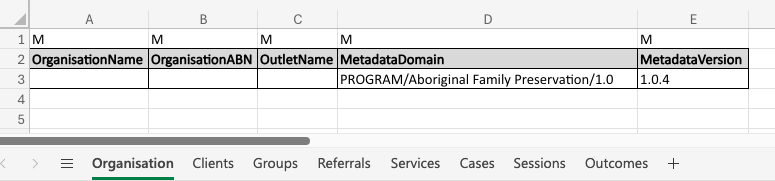
Step 2. Manually enter details on the Organisation tab
Tip:
'OutletName' must exactly match the name of the Outlet on InfoShare.

If you have multiple Outlets then the 'OutletName' column should be left blank.
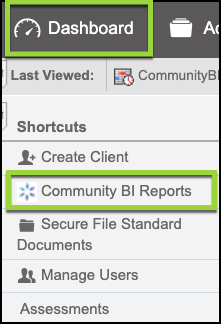
Step 3. Search for the InfoShare BI Reports directly from CDS
- Dashboard > Community BI Reports
- Search Name: ‘InfoShare’
Tip:
CDS users with the 'Manager Role' will see all reports.

If you don't have the role (permission) listed for the report, talk to your database manager
Step 4. Export each report as CSV
- Check the date parameter relative dates are set by default
Step 5. Populate the DCJ Bulk Upload Template with CDS data
- Copy each report from the CSV file, Right click, Paste Special >’Values’ to the corresponding sheet in the template
- Check all dates are in the format DD/MM/YYYY (or D/M/YY)
- Save (using an appropriate name) the populated template file in a location that you can retrieve
TIP:
If dates are in a different format, check your computer settings
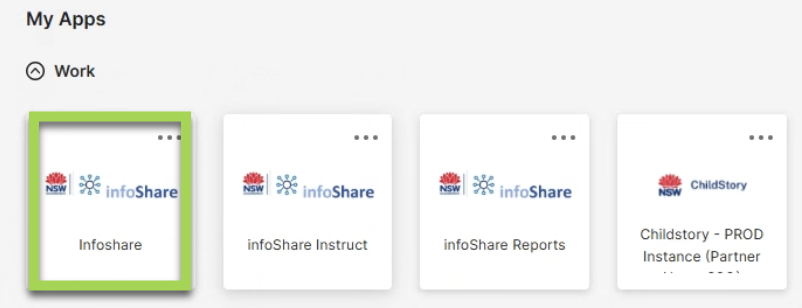
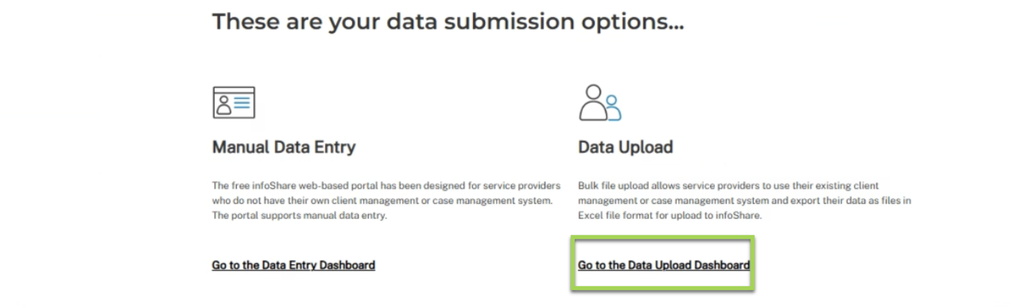
Step 6. Login to InfoShare to upload the populated template

Note:
You will need to be an InfoShare 'Organisation Administrator' to submit the CDS reports via the template to InfoShare.

Access to the InfoShare Platform is provided by DCJ, InfoShare Platform and access enquiries are outside of the CDS remit and should be directed to infoShare@dcj.nsw.gov.au
Tip:
If the upload fails, send the error to support@communityds.com.au and a member of the CDS team will be in touch
Related Articles
CommunityBI Reports – searching for a report
CommunityBI Reports – edit report permissions
Family Preservation in NSW, GEM and PEEM Assessments
Reach out to your CDS account manager if you are interested in finding out more about streamlining InfoShare reporting at your organisation for DCJ contracts Aboriginal Family Preservation, Families Together’, FFT-CW or MST- CAN® or if you need other reporting assistance.