
Department of Communities and Justice (DCJ) advocate that both the Growth and Empowerment Measure (GEM) and Parent Empowerment and Efficacy Measure (PEEM) Assessments should be administered with families on a quarterly basis. For further details please reference relevant DCJ Operations Manuals for ‘Aboriginal Family Preservation’ or ‘Families Together’ Family Preservation contracts.
TIP:
Assessments (CI Assessments) are used to create outcome surveys, collect data from practitioners and clients and provide outcomes analysis.  CDS customers are able to use the power of Collective Impact (CI) for many types of forms and assessments.
Instructions
Step 1. Log into your CRM database (refer to Logging On for further information)
TIP:
DCJ Recommend: "the GEM and PEEM must be administered in parallel at consistent points throughout a family’s involvement with the service. Completing both tools at the same time points provides a clear and aligned picture of changes in empowerment, wellbeing and parenting confidence.

For a typical 12‑month service duration, the GEM and PEEM must be administered at the following stages:

• Baseline: as soon as possible after service induction, once rapport has been established and the caregiver feels comfortable participating. This supports early case planning and shared goal‑setting.

• Every three months: completed during routine check‑ins and case planning. These intervals allow practitioners and caregivers to identify emerging strengths, monitor progress, and adjust support as needed.

• Exit: completed as close as possible to the end of service to reflect on progress, acknowledge growth and support transition planning."
Step 2. From the Family Preservation SESSION, find the quick link to the ‘CI Assessments’ Sub-Panel (or scroll down)
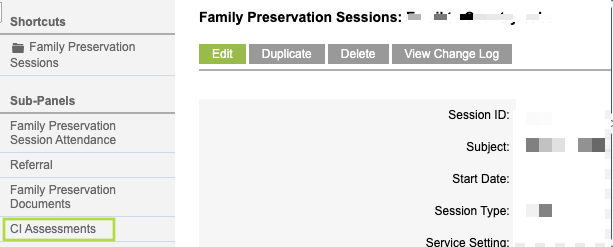
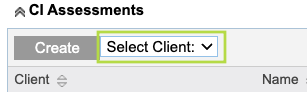
Step 3. Select the individual client who will be completing the assessment
TIP:
Individuals must be added to the session as a session attendee for them to be available in the CI Assessments Sub-panel for selection. A primary caregiver would typically complete the assessment on behalf of the family; however individual family members are able to complete separate assessments if appropriate.
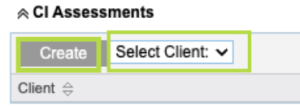
Step 4. Select ‘Create’
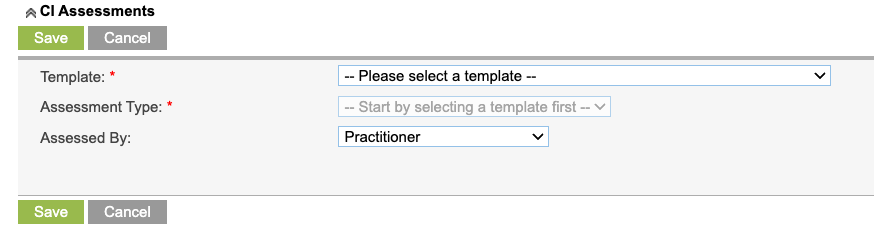
Step 5. Choose the template (GEM or PEEM)
Step 6. Select the Assessment Type (only one ‘Pre-Service’ assessment per case, all subsequent assessments are ‘Post-Service’)
Step 7. Choose the ‘Assessed By’ method
TIP:

• 'Practitioner' (worker completes assessment)

• 'Joint Client and Practitioner' (assessment completed together)

• Client via Email (uses individuals email as saved on the Client Record)

• 'Client via SMS' (uses individuals mobile phone as saved on the Client Record)

If an Assessment is sent to client either by email or SMS, once completed, your database will automatically be updated with responses.
Screenshot below is an example using Assessed by Client SMS.
– Refer to article CI Assessment – Create a CI Session Assessment on the other ways to use Assessed by
InfoShare reporting
GEM and PEEM responses should be uploaded to InfoShare. Bulk Upload reporting is currently under development and testing. Refer to Knowledge Base article -> InfoShare Reporting – Family Preservation
Note:
CDS customers are able to use the power of Collective Impact (CI) for many types of forms and assessments. For more information contact your Customer Services Consultant.
Further Information
For further information, refer to the following articles