
The SCORE Assessment Report will enable you to view the previous SCORE Assessments for an Attendee on a Case.
This is a great way to view any SCORE Assessments that have been created in the CRM to assist with entering paired data.
Typically this would be accessed when entering a new SCORE Assessment on a Session.
This feature might not yet be enabled on your database. Please contact your Account Manager if you would like to discuss enabling this on your database.
Instructions
Step 1. Log into your CRM database (refer to Logging On for further information)
Step 2. Locate the Case in the CRM database and add your new Session
Step 3. Create an Individual SCORE Assessment for the Session Attendee and Save. You will be directed to the Assessment page (refer to DSS SCORE Assessment for an individual for further information)
Step 4. At the top of the screen you will see a heading “Individual SCORE History” with a button titled “Load Report” underneath.
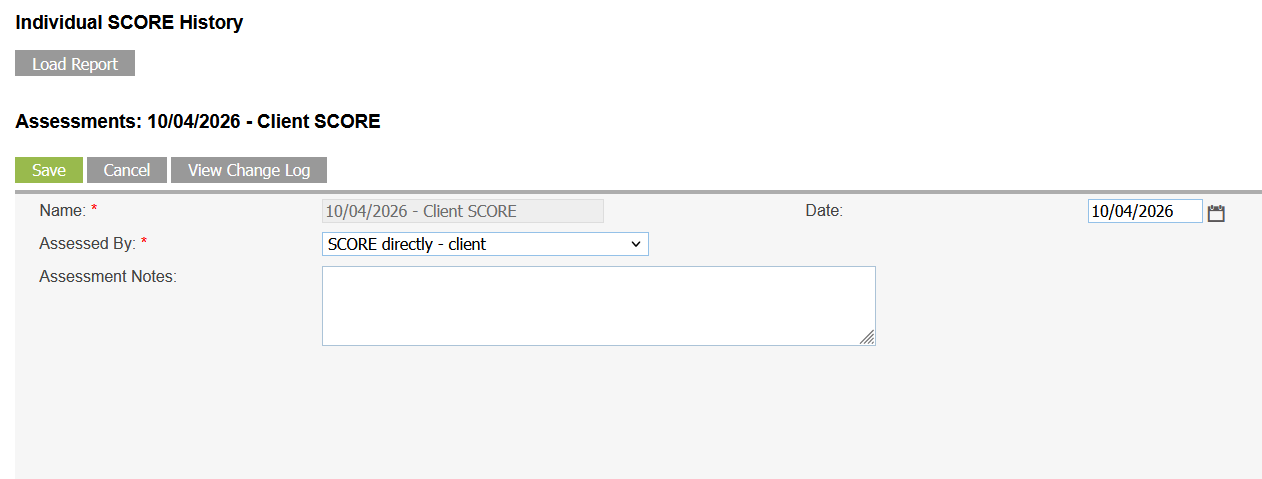
Click the “Load Report” Button. It may take a few seconds to load.
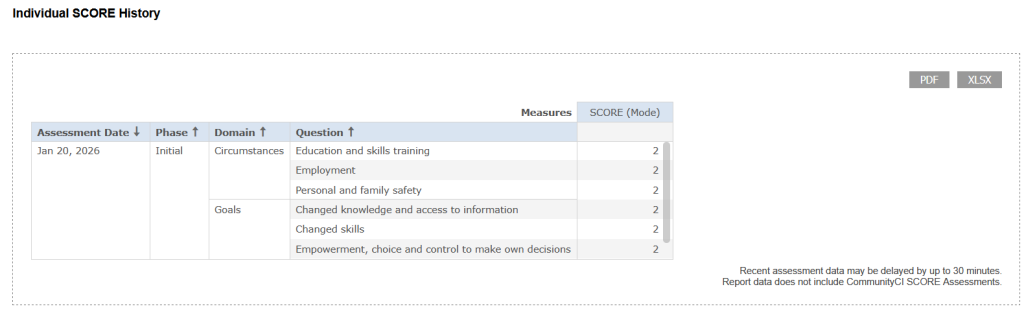
The embedded report will show the Assessment Date, Initial/Subsequent, SCORE Domain, Question and the Response (on the 1-5 scale).